Connect the Holostep viewer to UNAS
UNAS loads the viewer through its custom JavaScript field. The account ID in that script connects the shop to your Holostep account.
Before you begin
Have access to UNAS administration and the JavaScript issued by Holostep for your store.
Installation steps
Open the script insertion screen
Sign in to UNAS administration and open the script insertion screen, labelled “Script beszúrása” in Hungarian. The direct admin link below opens this screen after login.
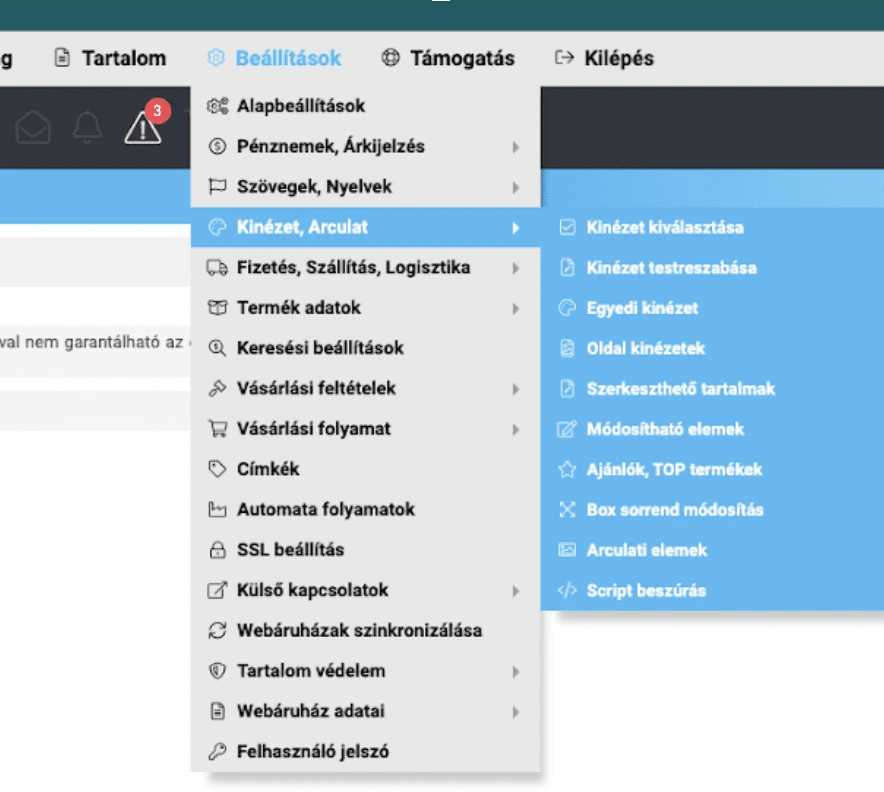
Where to find script insertion in UNAS administration. Paste the JavaScript into the script field
Paste the JavaScript issued for your account. This field expects JavaScript itself, without an outer HTML script tag. If using the example, replace YOUR_ACCOUNT_ID with your assigned account ID.
(function () {
  const script = document.createElement('script');
  script.type = 'module';
  script.async = true;
  script.src = 'https://onsite.holostep.io/serve/core.js?accountId=YOUR_ACCOUNT_ID';
  document.head.appendChild(script);
})();
Activate the script and check the storefront
Save and activate the entry. Open a public product page with a model already published in Holostep. Reload the page and check that the viewer displays the matching product.
Check the result
Open the configured product in a new window. Check that the correct model loads and rotates with a mouse and touch. If AR is enabled for the product, try placing it in your space on a supported phone.
If the viewer does not load, check activation, the account ID and the format of the pasted code. Send support the affected product URL.
Related links
See it with your own products.
Your customers compare several suppliers. Whoever shows them exactly what they’re looking for first starts with an advantage.
In a short call, we’ll show you how your own products would work with Holostep, and tell you the effort and the price.
- 15, 30 or 60-minute call in English
- No obligation
- We show it on your own products
- No IT project needed

Choose a 15, 30 or 60-minute slot.
Open in new tabLoading form…